Why Do You Need Integration with Salesforce?
Integrating different systems within your Salesforce implementation or projects is essential for a comprehensive approach to managing business processes. Although Salesforce is a powerful platform capable of handling a wide range of tasks related to sales, marketing, customer support, and analytics, it cannot fulfill every business need on its own.
For instance, integrating Salesforce with an accounting system is a common practice. This integration allows businesses to automatically generate invoices in the accounting system when an opportunity is marked as closed won in Salesforce. Similarly, integrating Salesforce with a company’s proprietary system or external services like DocuSign enables the seamless transfer of customer signup data and usage information directly into Salesforce.
Such integrations not only streamline separate processes but also enhance the efficiency and effectiveness of business operations. The foundation of these integrations is typically an Application Programming Interface (API), which facilitates communication between different software applications. Salesforce, being at the forefront of cloud computing, offers a variety of standard APIs that enable these integrations through various methods.
In this article we will cover the following topics:
- Types of Integration Architectures
- Salesforce Integration Capabilities
- Integration Patterns in Salesforce
- The Process of Integrating Non-Public Services with Salesforce
- A Team Behind Salesforce Integrations
- Time Considerations for Salesforce Integration Non-Public Services
- Specific Integration Cases: Complexity and Workforce Requirements
- Maintenance Requirements for Salesforce Integrations
- Maintaining Salesforce Integrations
- FAQs about Salesforce Integrations
Types of Integration Architectures
Understanding the architecture behind system integrations is crucial for selecting the most suitable approach for your project. There are three primary architectures commonly used in the field:
Point-to-Point Integration
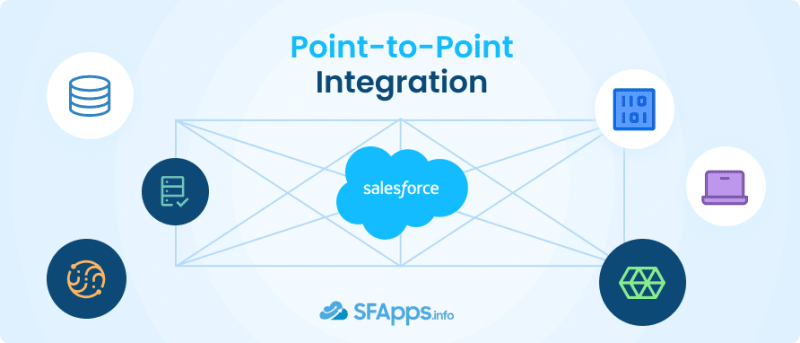
This architecture involves direct connections between systems, where each system communicates with another through a one-to-one relationship. While this may seem straightforward, it becomes complex and costly as the number of integrations increases. Each new system added requires a new set of integrations, making maintenance and scalability challenging. Despite its simplicity, the lack of standardization can lead to performance inconsistencies.
Hub and Spoke Integration
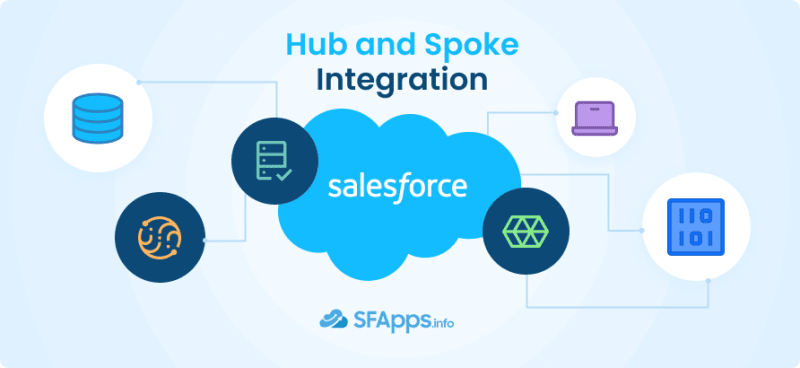
To mitigate some of the drawbacks of point-to-point integrations, the hub and spoke model introduces a centralized hub that manages communication between systems. This reduces the number of direct connections required, as each system connects to the hub, which then routes messages to the appropriate destination. This model improves upon the scalability and maintenance issues of point-to-point integration but introduces a single point of failure. If the hub experiences issues, all communication can be disrupted.
Enterprise Service Bus (ESB)

The ESB architecture evolves from the hub and spoke model by offering a more flexible and robust integration framework. It decouples systems entirely, eliminating a single point of failure and enhancing scalability. Systems communicate through the ESB, which handles routing, transformation, and orchestration of messages. Salesforce’s MuleSoft is an example of an ESB, demonstrating its capabilities in integrating disparate systems seamlessly.
Insight:
Each architecture has its own set of pros and cons, and the choice among them depends on specific project requirements such as scalability, complexity, and resilience to failures. Understanding these architectures is fundamental to planning and implementing effective integrations that align with your organizational needs.
Salesforce Integration Capabilities
Salesforce, a pioneer in cloud computing, has always emphasized the importance of integration, making its platform exceptionally open and adaptable. Since the release of its first API in 2000, Salesforce has developed a robust set of APIs and features to support various integration scenarios, ensuring that businesses can connect Salesforce with other systems in multiple ways. Here are the key Salesforce integration capabilities:
- REST API: Primarily designed for web and mobile applications, the Salesforce REST API facilitates database operations like querying (GET), creating (POST), and updating (PUT) records. It operates synchronously, making it ideal for scenarios where immediate feedback on the success of an operation is necessary.
- SOAP API: Although it may be considered older technology, the SOAP API is reliable for legacy integrations. It’s known for being secure and comprehensive but can be slower and more bandwidth-intensive compared to REST. The SOAP API operates asynchronously, suitable for processes that don’t require instant feedback.
- Bulk API: For operations involving large volumes of data (up to 100 million records per 24 hours), the Bulk API is the go-to choice. It supports asynchronous processing, allowing for large-scale data manipulations either in serial or parallel modes, enhancing efficiency and scalability.
- Streaming API: When real-time data synchronization between Salesforce and external systems is needed, the Streaming API provides a solution. It enables external systems to subscribe to certain events in Salesforce and receive notifications as soon as data changes occur, facilitating near-instant integration.
- Outbound Messages: For scenarios that prefer configuration over coding, outbound messages offer a straightforward integration method. By sending SOAP-based messages from Salesforce to external systems, including field data for further processing, this feature supports asynchronous communication while ensuring the receiving system acknowledges the message.
- Web Service Callouts: Salesforce can initiate outbound integrations to external systems through web service callouts. This capability is particularly useful for verifying data with external databases directly from Salesforce, with Salesforce acting as the initiator of the call.
- Salesforce Connect: This paid feature allows for data virtualization, where external data can be viewed within Salesforce without actual data storage. It’s an effective solution for accessing large datasets from external systems within Salesforce, optimizing performance and data storage.
- MuleSoft: As part of Salesforce’s suite of products, MuleSoft offers a comprehensive integration platform that unifies APIs, integrations, and systems, facilitating complex integration scenarios across various applications and data sources.
- Heroku: Another Salesforce integration service, Heroku, provides a platform-as-a-service (PaaS) environment for building and deploying custom applications. Heroku Connect enables seamless integration between Salesforce and Heroku applications, expanding the possibilities for custom application development and data synchronization.
Salesforce’s integration capabilities are extensive, offering various methods to suit different integration needs, from simple data synchronization to complex, real-time data processing. Understanding these capabilities is essential for leveraging Salesforce’s full potential in connecting and automating business processes across different systems.
Salesforce Integration Direction
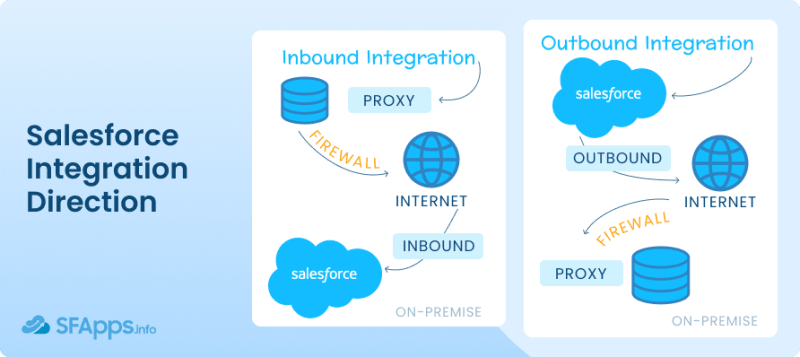
Any Salesforce integration can be in two directions: inbound integration or outbound Integration, where Inbound integration is an external system initiates contact with Salesforce, while outbound integration is the type of connection, when Salesforce initiates contact with an external system. You may understand the concept better by viewing the image above.
Integration Patterns in Salesforce
When planning a Salesforce integration, it’s vital to consider various factors like the integration type, data volume, timing, and direction to determine the most appropriate method and pattern for your needs. Integration patterns provide a structured approach to solving common integration problems, guiding how different systems interact with one another. Salesforce recommends several key patterns, each suited to specific scenarios:
- Remote Call-In: This pattern is used when an external system needs to create, retrieve, update, or delete data in Salesforce. For instance, an order management system might update Salesforce with the latest order status. This pattern is crucial for ensuring that Salesforce remains synchronized with external business processes.
- Request and Reply: Salesforce initiates a process in an external system and waits for it to complete before continuing. This synchronous interaction is necessary when the result of the external process directly impacts the next steps in Salesforce, like verifying a billing address via an external service.
- Fire and Forget: In this asynchronous pattern, Salesforce triggers an action in an external system but does not wait for the process to complete. The external system acknowledges the request, allowing Salesforce to continue its processes without delay. This pattern is useful for tasks that are not time-sensitive, such as logging activity data.
- Batch Data Synchronization: This pattern is applied when large volumes of data need to be synchronized between Salesforce and an external system periodically. It allows for the efficient updating of records in bulk on a scheduled basis, keeping both systems in alignment.
- UI Update Based on Data Changes: When changes in Salesforce data need to reflect immediately on the user interface, this pattern ensures that users have access to the most current information. It’s particularly useful in customer service scenarios, where agents must have up-to-date case status information.
- Data Virtualization: This pattern involves displaying external system data within Salesforce without physically storing it in Salesforce. It’s beneficial for accessing large datasets in real time without impacting Salesforce’s storage limits or performance. Salesforce Connect often utilizes this pattern to present external data seamlessly within Salesforce interfaces.
These patterns form the foundation of effective integration strategies, enabling Salesforce professionals to choose the most appropriate solutions for their specific project requirements. By understanding and applying these patterns, you can ensure that your Salesforce integrations are efficient, scalable, and tailored to your business needs.
The Process of Integrating Non-Public Services with Salesforce
Integrating a custom-built proprietary ERP system or any other custom software or app with Salesforce involves several structured steps to ensure a seamless connection that meets business requirements. This process is aimed at allowing the two systems to communicate effectively, sharing data and processes that enhance the organization’s operational efficiency. Here’s a step-by-step overview of how these integrations typically unfold:
- Requirement Analysis: The first step involves understanding the business needs and how the integration can address these requirements. This phase defines what data and processes need to be shared between the app and Salesforce.
- Planning and Design: Based on the requirements analysis, a detailed integration plan is created. This includes selecting the integration method (APIs, middleware, etc.), defining data mappings between the systems, and designing the data flow and synchronization logic.
- Environment Setup: Before starting the integration, it’s essential to prepare the environments in both systems. This might involve setting up test environments, configuring API access, and ensuring that both systems are ready for integration.
- Development: With the plan in place, the development team starts building the integration. This typically involves coding the data exchange logic, transforming data formats as needed, and implementing any business logic specific to the integration.
- Testing: After development, rigorous testing is conducted to ensure the integration with Salesforce works as expected. This includes unit testing, system integration testing, and user acceptance testing (UAT) to catch and fix any issues.
- Deployment: Once testing is completed and the integration is approved, it’s deployed to the production environment. This step often requires careful planning to minimize disruption to existing operations.
- Documentation and Training: After deployment, documentation is provided to end-users and administrators. Training sessions may also be conducted to ensure users can effectively utilize the new integrated system capabilities.
- Monitoring and Optimization: Following deployment, the integration is continuously monitored for performance and any issues that may arise. Optimization efforts may be undertaken to enhance efficiency or address any unforeseen challenges.
This process requires a collaborative effort from both technical and business teams to ensure the integration aligns with the organization’s needs and leverages the full capabilities of both the ERP and Salesforce.
A Team Behind Salesforce Integrations

The task of completing any custom Salesforce integrations typically falls on a dedicated team composed of various roles, each bringing a unique set of skills and expertise to the project. The complexity and requirements of the integration will dictate the exact composition of the team, but generally, it includes:
- Administrators: They play a crucial role in the initial stages, setting up and configuring the systems for integration. Their deep understanding of the internal system, which should be integrated, and Salesforce systems is crucial for identifying potential challenges and ensuring that the integration does not disrupt existing workflows.
- Developers: Salesforce developers are the backbone of the integration process, responsible for writing the code that will link the custom system or app with Salesforce. They work closely with system administrators and business analysts to understand the requirements and translate them into technical solutions. Developers need to be proficient in the programming languages and APIs used by both systems.
- Salesforce Integration Specialists or Architects: For more complex integrations, a specialist with extensive experience in integrating diverse systems might lead the project. These individuals are experts in middleware and integration platforms and can design robust, scalable integration solutions. They ensure that the integration architecture aligns with the organization’s broader IT strategy.
- Business Analysts: While not directly involved in the technical implementation, business analysts are crucial for bridging the gap between the business needs and the technical team. They ensure that the integration meets the business requirements and improves operational efficiency.
Certification and Specialization
While not always mandatory, certifications related to Salesforce and potentially other integration platforms (like MuleSoft, Informatica, etc.) can be highly beneficial. Salesforce offers a range of certifications that validate an individual’s expertise in the platform, including Administrator (you may learn more here how hard Salesforce Admin certification is), Developer, and Architect credentials that are particularly relevant for integration projects.
Certifications specific to integration, such as those offered by middleware providers, can also be valuable, demonstrating a deep understanding of best practices and advanced integration techniques.
Additionally, for integrations involving complex business logic or significant customization, having certified professionals on the team can provide reassurance of their ability to handle challenging scenarios and ensure a successful integration.
Time Considerations for Salesforce Integration Non-Public Services
The time required to complete a custom integration with Salesforce can vary significantly based on several key factors. Understanding these factors is crucial for setting realistic expectations and planning effectively. Here’s a breakdown of what influences the time frame for such integration projects:
- Complexity of the System to be Integrated: The intricacy of the app or system in question is a primary determinant of the project’s duration. A system with complex business logic, numerous custom modules, or extensive data sets will require more time for analysis, mapping, and integration compared to a simpler system.
- Integration Scope and Requirements: The broader and more complex the integration requirements, the longer the project will likely take. This includes the number of data points to be synchronized, the frequency of data updates, and the complexity of any business processes that need to be integrated across the systems.
- Integration Methodology: The approach chosen for the integration can also impact the timeline. Direct API integrations might be quicker to implement but could require more custom development work. In contrast, using an integration platform or middleware could speed up the process but might also involve additional configuration and testing time.
- Quality Assurance and Testing: Testing is critical to ensure the integration works as intended and does not introduce errors into either system. The complexity of the testing process can affect the overall timeline, especially if iterative testing is required to address unforeseen issues or if the integration involves complex business logic.
- Team Experience and Availability: The expertise and availability of the team members working on the integration project can significantly impact the timeline. Experienced professionals can navigate challenges more efficiently, potentially speeding up the process. However, if team members are juggling multiple responsibilities or if there is a learning curve associated with the systems involved, the project may take longer.
- Post-Deployment Adjustments and Optimization: After the initial deployment, there may be a need for adjustments based on user feedback or performance issues. This phase of optimization and refinement can extend the project timeline but is essential for ensuring the integration meets business needs.
Insight:
On average, simpler integration projects might be completed in a matter of weeks, while more complex integrations could take several months or even longer. Early in the planning phase, it’s essential to consider these factors to establish a realistic timeline and manage stakeholder expectations effectively.
Specific Integration Cases: Complexity and Workforce Requirements

Integrating Salesforce with various other platforms varies in complexity, depending on the specific functionalities and data flows required. Here’s an assessment of several common integration scenarios, their complexity, and the workforce needed for implementation:
Salesforce Sales Cloud IVR API Integration
This involves connecting Salesforce with an Interactive Voice Response (IVR) system to enhance customer service operations. It’s moderately complex due to the need for real-time data exchange and possibly custom voice responses. A team including developers skilled in API integration and a project manager to oversee the workflow is typically required.
Salesforce Call Center Integration

Integrating call center software with Salesforce can range from moderate to high complexity, depending on the call center’s features and the level of integration desired (e.g., call logging, and screen pop-ups). This project often requires developers, a system administrator, and a business analyst to ensure the integration supports customer service processes effectively. But with the power of call center dashboards in Salesforce, the team will be able to optimize the process effortlessly.
Salesforce Outlook/Gmail Integration
Salesforce offers native support for integrating with email clients like Outlook and Gmail, which reduces the complexity of such projects. These integrations are generally straightforward, requiring minimal custom development and primarily involving configuration work handled by a system administrator or a Salesforce specialist. After such an integration, you would be able to enable Einstein activity capture for your emails.
HubSpot Salesforce Integration

This is a common integration for syncing marketing and sales activities. The complexity is moderate, mainly involving mapping fields and ensuring consistent data flow. A team with experience in both platforms is needed, typically including a marketing operations specialist and a developer or integration specialist. With the power of Salesforce and Hubspot integration, you may get even more comprehensive Salesforce CRM analytics insights.
Mailchimp Salesforce Integration

Similar to HubSpot, integrating Mailchimp with Salesforce for email marketing purposes is moderately complex. It involves data synchronization and segmentation logic. The project can usually be managed by a marketing operations specialist with support from a Salesforce administrator.
Jira Salesforce Integration
Integrating Salesforce with Jira for project management and issue tracking involves a moderate level of complexity, focusing on workflow automation and data synchronization. A team including a project manager, a developer with experience in both platforms and a system administrator is typically necessary.
Salesforce Slack Integration
This integration enhances communication and collaboration by connecting Salesforce records with Slack channels. It’s relatively straightforward, mostly involving configuration rather than extensive development, and can often be managed by a Salesforce administrator or a team familiar with both platforms.
Salesforce and Microsoft Dynamics 365 Integration
Integrating these two platforms can be quite complex due to their extensive functionalities and the potential need for real-time data synchronization across business processes. Popular modules for integration include sales, customer service, and marketing. A team consisting of specialists in both Dynamics 365 and Salesforce, including Microsoft Dynamics developers and business analysts, is essential. This integration may also require the use of middleware or custom-built connectors, depending on the specific requirements.
Specialized apps or middleware platforms are often utilized to facilitate a smoother connection between Salesforce and Dynamics 365, addressing the technical complexities and reducing the need for extensive custom development.
Maintenance Requirements for Salesforce Integrations
After the initial deployment of a Salesforce integration, regular maintenance is essential to ensure its continued effectiveness and to adapt to any changes in the business environment, software updates, or data structures. Maintenance activities can vary based on the complexity of the integration, the platforms involved, and the specific business requirements. Here’s an overview of common maintenance needs and considerations for Salesforce integrations:
- Monitoring and Troubleshooting: Continuous monitoring of the integration is crucial to quickly identify and address any issues that may arise, such as errors in data synchronization or failures in data exchange due to network issues. This involves setting up alerting mechanisms for system errors and regularly reviewing integration logs.
- Updates and Upgrades: Both Salesforce and the integrated platforms frequently release updates that can impact the integration. These may include API changes, new features, or security patches. Regularly reviewing and applying these updates is necessary to maintain the integration’s functionality and security.
- Data Quality and Synchronization: Over time, discrepancies can occur between the data stored in Salesforce and the integrated systems. Regular checks are needed to ensure data accuracy and consistency, which might involve cleaning up duplicate records, correcting mismatches, and verifying synchronization rules.
- Performance Optimization: As the volume of data and the number of users grow, the integration may experience performance issues. Regular review and optimization of the integration logic, data flow, and usage of resources can help maintain optimal performance levels.
- Adapting to Business Changes: Businesses evolve, and so do their processes and data needs. The integration may require adjustments to accommodate new business requirements, such as integrating additional data fields, modifying workflows, or adding new functionalities.
Maintaining Salesforce Integrations
The responsibility for maintaining Salesforce integrations often falls to a specialized role or team within the organization, such as:
- Salesforce Administrators: They can handle routine maintenance tasks, such as monitoring integration performance, managing user permissions, and applying straightforward updates or configurations.
- Developers or Integration Specialists: For more complex issues, such as debugging code, optimizing performance, or implementing significant changes to the integration logic, skilled developers or integration specialists with knowledge of both Salesforce and the integrated platforms are needed.
- Dedicated Integration Team: In larger organizations or for more complex integrations, a dedicated team may be responsible for ongoing maintenance. This team typically includes roles such as project managers, business analysts, developers, and system administrators.
The frequency of maintenance activities can vary, but it’s common practice to conduct at least a quarterly review of the integration’s performance and any potential issues. More frequent checks may be necessary immediately following an update or when integrating critical business processes.
FAQs about Salesforce Integrations
What does integration with Salesforce entail?
Integration with Salesforce refers to connecting Salesforce with other systems or applications to synchronize data and processes. This can enhance functionality, improve efficiency, and provide a unified view of customer information across different business areas.
How can Salesforce integrations benefit my business?
Salesforce integrations enable your business to leverage Salesforce capabilities alongside other software tools and systems. Benefits include streamlined operations, enhanced data visibility, and improved customer experiences by unifying disparate systems.
What should I consider when planning to integrate with Salesforce?
When planning to integrate with Salesforce, consider your business objectives, the data flow requirements, and how the integration will improve or streamline processes. Evaluating these factors will help ensure a successful integration that meets your business needs.
Why is Salesforce integration consulting important?
Salesforce integration consulting is crucial for identifying the most effective strategy and tools for integrating Salesforce with other systems. Consultants provide expertise and insights that can significantly reduce the complexity, time, and cost associated with integration projects.
What are Salesforce integration services?
Salesforce integration services include a range of offerings designed to help businesses connect Salesforce with other applications and systems. These services can cover everything from planning and implementation to ongoing support and maintenance of integrations.
How does a Salesforce integration service differ from other services?
A Salesforce integration service specifically focuses on creating seamless connections between Salesforce and other systems, ensuring data consistency, process automation, and enhanced functionality. It differs by providing specialized expertise in Salesforce’s API and its ecosystem.
What role does a Salesforce integration specialist play?
A Salesforce integration specialist has in-depth knowledge of Salesforce and its integration capabilities. They are experts in designing, implementing, and managing integrations that extend Salesforce’s functionality to meet specific business needs.
When should I engage a Salesforce integration consultant?
Engaging a Salesforce integration consultant is advisable when you need expert guidance on best practices, strategies, and tools for integrating Salesforce with other systems. Their expertise ensures the integration aligns with your business goals and is executed efficiently.
What distinguishes Salesforce integration consultants from general consultants?
Salesforce integration consultants possess specialized knowledge of Salesforce’s architecture, APIs, and best practices for integration. Unlike general consultants, they focus specifically on creating effective Salesforce integrations to optimize business processes.
Why collaborate with Salesforce integration partners?
Collaborating with Salesforce integration partners brings specialized expertise and resources to your Salesforce integration projects. These partners have a proven track record and deep knowledge of Salesforce, ensuring high-quality and successful integrations.
Final Thoughts on Salesforce Integrations
Integrating Salesforce with diverse platforms, including custom-built proprietary ERP systems or popular applications like Dynamics 365, significantly enhances business processes and operational efficiency. This journey from conceptualization to ongoing maintenance ensures that integrations are aligned with business needs and are adaptable to future changes.
Success in the Salesforce integration project hinges on a comprehensive understanding of Salesforce’s integration architectures and capabilities. By choosing the right approach—point-to-point, hub and spoke, or enterprise service bus (ESB)—organizations can build scalable and efficient integrations. Salesforce’s extensive API offerings and integration tools provide the versatility needed to connect with a myriad of systems, facilitating seamless data exchanges and automated workflows.
Implementing these integrations requires a team of skilled professionals, including system administrators, developers, and possibly integration architects, who have a deep knowledge of both Salesforce and the systems being integrated. This expertise, often validated through certifications, is crucial for navigating the complexities of integration. The timeline for completing these integrations can vary greatly, influenced by the systems’ complexity, the integration’s scope, and the chosen methodology.
Different integration scenarios, such as connecting Salesforce with IVR systems, call centers, email clients, marketing platforms, and project management tools, vary in complexity and workforce needs. Tailoring the approach to each scenario ensures that integration provides seamless functionality and data flow.
Maintaining these integrations is an essential, continuous effort. Regular monitoring, troubleshooting, and optimizing the integrations are necessary to resolve any issues and ensure they effectively support business operations. This responsibility usually falls to specialized individuals or teams within the organization, dedicated to preserving the integration’s functionality and relevance.
Strategically integrating Salesforce with other systems unlocks the potential to significantly improve data accuracy and operational efficiency, creating a more interconnected and effective business environment. By meticulously planning, executing, and maintaining these integrations, businesses can harness the full power of Salesforce, gaining a competitive advantage in their industry.
]]>